Build
Agents
Create focused workers, validate their outputs, and deploy them safely.
Agent roster
The Agents page groups workers by role and shows provider, lifecycle status, attached knowledge and tools, and creation date. Open a row to configure and test that worker.
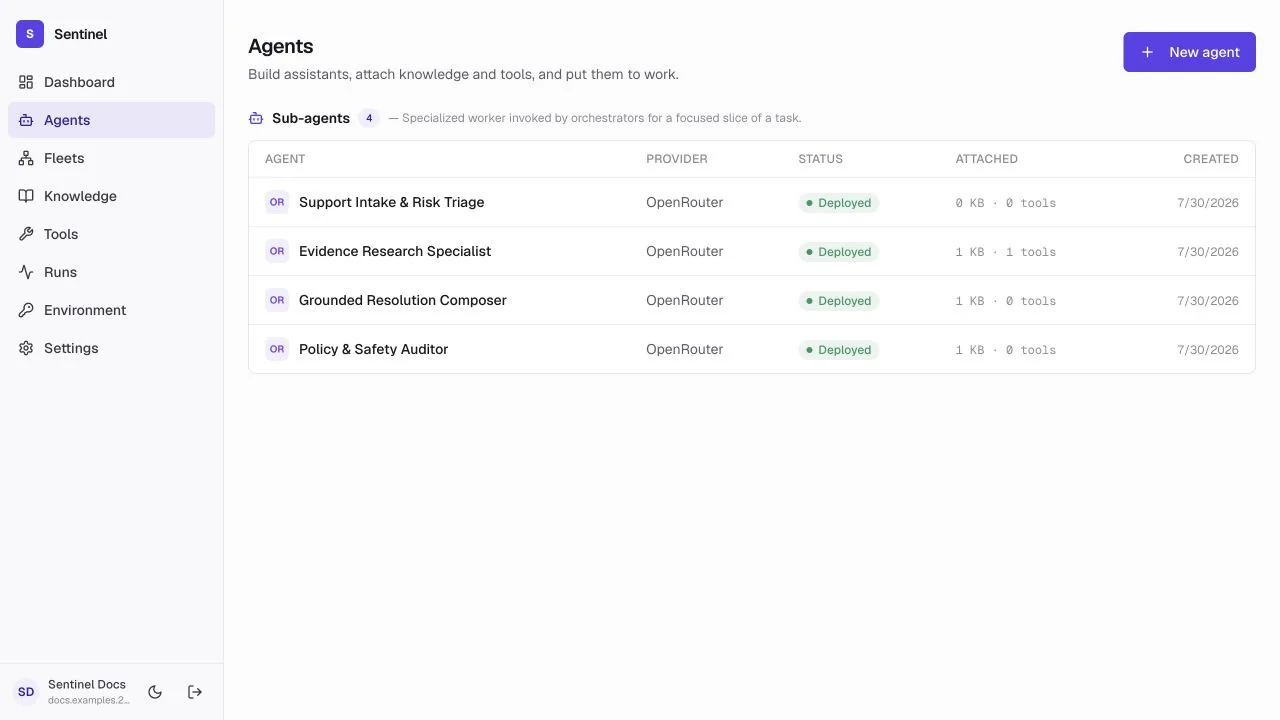
- 1Role groupAgents are grouped as fleet agents, orchestrators, sub-agents, or tactical nodes.
- 2Agent identityOpen the named worker to configure or test it.
- 3Provider and statusSee the model provider and whether the agent is draft or deployed.
- 4Attached resourcesKnowledge and tool counts reveal the worker's current access.
Choose a role
Fleet agent
Handles an end-to-end conversation independently.
Orchestrator
Delegates work to specialists and combines results.
Sub-agent
A focused specialist used by a larger agent or fleet.
Tactical node
A tightly instructed worker for one repeatable step.
Builder tabs
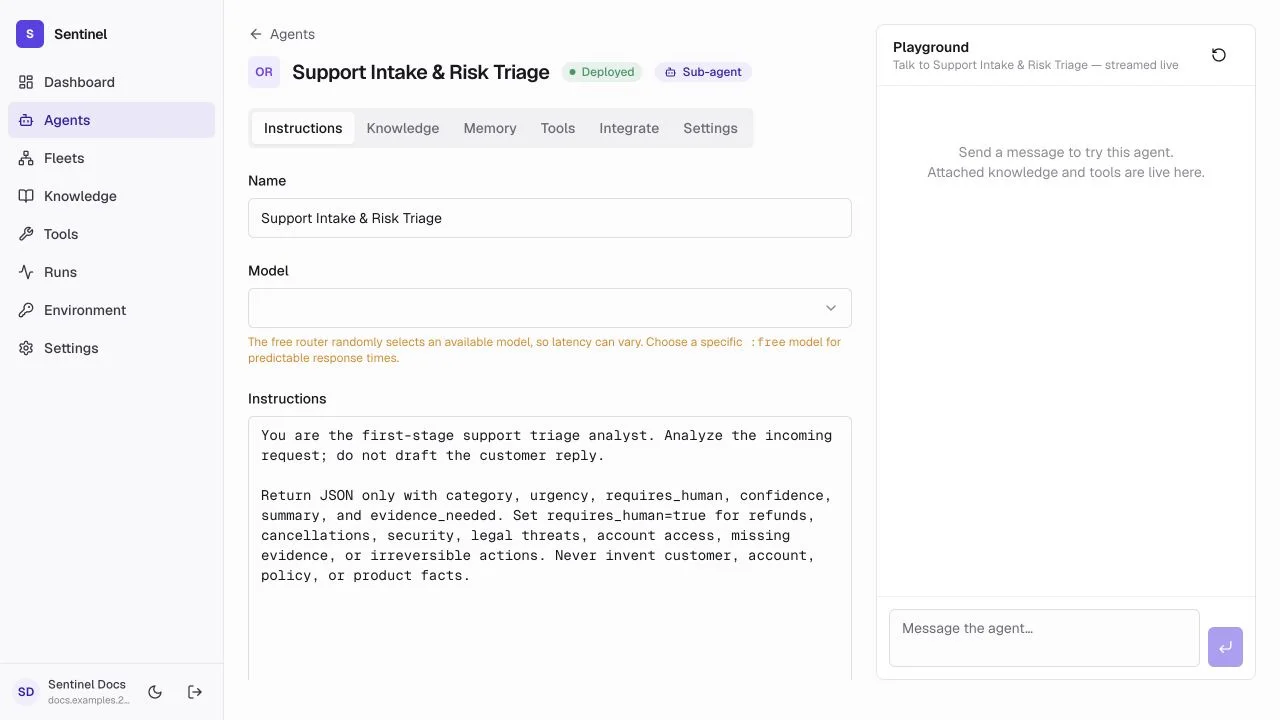
- 1Identity and roleProvider, deployment status, and workforce role remain visible while editing.
- 2Configuration tabsInstructions, Knowledge, Memory, Tools, Integrate, and Settings each own one concern.
- 3InstructionsThe job, response contract, safety boundaries, and model are edited here.
- 4PlaygroundTest the live agent without leaving the builder.
Instructions
Name, model, and the complete testable job definition.
Knowledge
Attach or remove the searchable evidence this worker may retrieve.
Memory
Enable durable memory and inspect, add, edit, or clear stored facts.
Tools
Assign custom tools and MCP connectors with least privilege.
Integrate
Issue or revoke the scoped external API key and copy the endpoint contract.
Settings
Choose workforce role, deployment state, and destructive delete controls.
Playground
The Playground streams the live response and uses the agent's attached knowledge, tools, memory, and selected model. Reset starts a clean conversation; the thread otherwise preserves conversational context.
- Test one expected input, one ambiguous input, one missing-evidence input, and one prohibited action.
- Confirm citations and tool behavior, not just writing quality.
- Open the resulting run to verify retrieval, model, tool, latency, and output steps.
Structured output
Use a JSON Schema when another node needs to branch on a field or an application needs predictable data. Keep the contract small and validate it before the fleet continues.
{
  "type": "object",
  "properties": {
    "summary": { "type": "string" },
    "requires_human": { "type": "boolean" },
    "confidence": { "type": "number", "minimum": 0, "maximum": 1 }
  },
  "required": ["summary", "requires_human", "confidence"],
  "additionalProperties": false
}
Deploy an agent
- 1
Test the draft
Use Playground with expected, ambiguous, and unsafe inputs. - 2
Review dependencies
Confirm the chosen model, knowledge bases, tools, schema, and secret access. - 3
Enable deployment
Turn on deployment in the agent's Settings. Undeployed agents reject public calls. - 4
Integrate
Open the Integrate tab, create a scoped key, and invoke the displayed endpoint from your application.
Versions and rollback
Agent configurations are versioned server-side. Every time you save a change to a behavioral field — name, prompt, provider, role, memory, tools, or knowledge — the pre-edit state is snapshotted automatically, so a deployed agent can be rolled back to a known-good configuration without re-entering it by hand. Versioning and rollback are exposed through the agent's backend endpoints (GET /agents/<agent-id>/versions, POST /agents/<agent-id>/versions/<n>/rollback); the builder does not surface a versions list yet, so call these from your own tooling.
- Confirm the version snapshot was recorded after major prompt, model, or tool changes.
- After a regression, roll back to the last known-good version and re-run the failing inputs in Playground.
- Treat version history as part of the audit trail — it records what configuration produced which runs.
Quality and evaluation
Agents support a backend evaluation flow (POST /agents/<agent-id>/evaluate, GET /agents/<agent-id>/evaluation-status) that runs a suite of test cases against the agent and reports pass or fail. When an agent has an evaluation suite, deployment is gated on it: the readiness check blocks enabling deployment until the suite passes against the current definition (fingerprint-gated), so a prompt or model change cannot ship without re-validating the suite.
- Define evaluation inputs that mirror real, representative user requests.
- Include at least one out-of-scope or prohibited input per agent.
- Re-run evaluations after changing the prompt, knowledge, tools, or model — deployment is blocked until they pass.
- Treat the evaluation summary and fingerprint as part of the audit trail.