Operate
Workspace settings
Manage provider keys, model configuration, and workspace identity.
Settings workspace
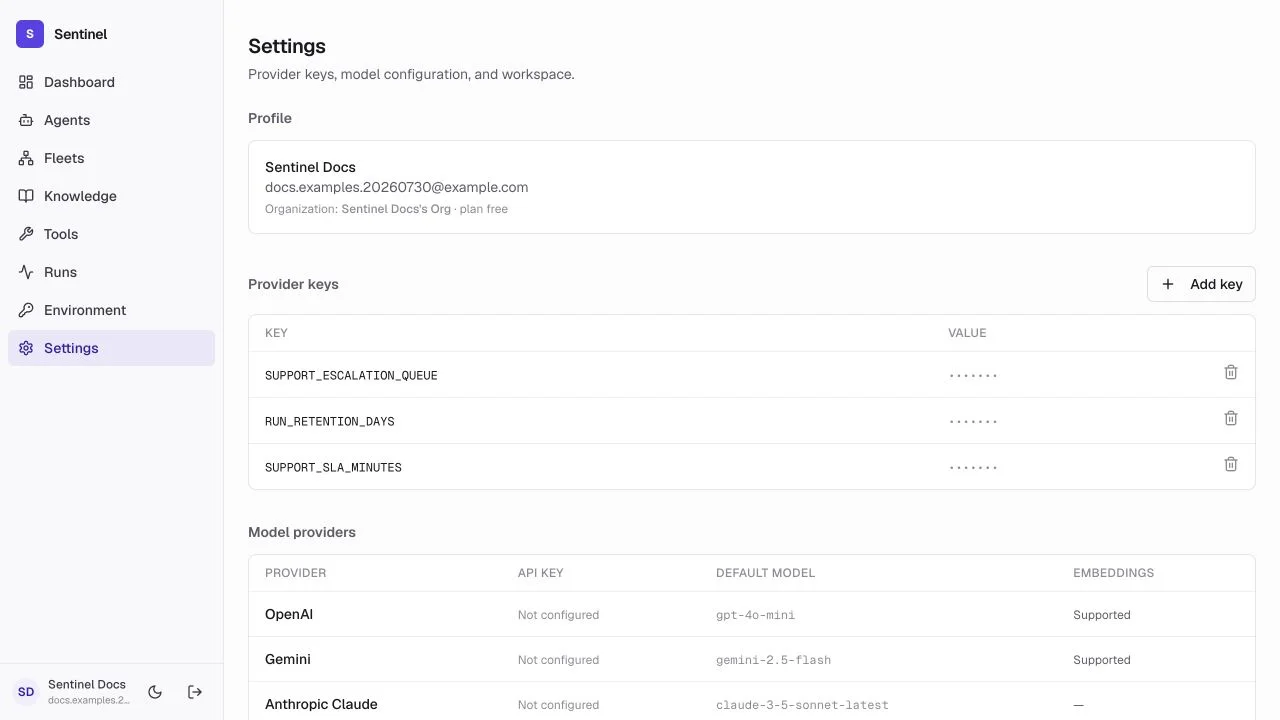
- 1ProfileThe signed-in user and the current organization name and plan.
- 2Provider keysAdd or remove the credentials that unlock model catalogs.
- 3Model providersConfigured status, default model, and embedding support per provider.
- 4MembersRead-only membership list for the current organization.
Profile
The profile section shows the signed-in user's name, email, and the active organization with its plan tier. The active workspace scopes agents, fleets, knowledge, tools, runs, secrets, and members. Confirm it before changing shared configuration.
Provider keys and models
Provider keys are the credentials that unlock model catalogs and embedding providers. Keys are stored encrypted in the workspace vault, shown masked after saving, and deleting one can break any agent that depends on it. The model providers table shows each provider's configured status, default chat model, and whether embeddings are supported.
- Add a provider key before building an agent that needs that provider.
- Rotate keys in a maintenance window and re-test affected agents in Playground.
- Use run traces and resource histories for operational accountability.
Members
Membership is read-only in the current UI: the page lists the users in the organization and their roles. Inviting teammates and changing roles is performed by the platform owner through the organization management endpoints.