Examples
Example: create a production agent
Build the structured risk-triage specialist used by the production fleet example.
Agent outcome
Support Intake & Risk Triage turns a raw support request into a small decision contract: summary, category, severity, confidence, and whether a person is required. It is deliberately a tactical node--classification and routing only, never account changes.
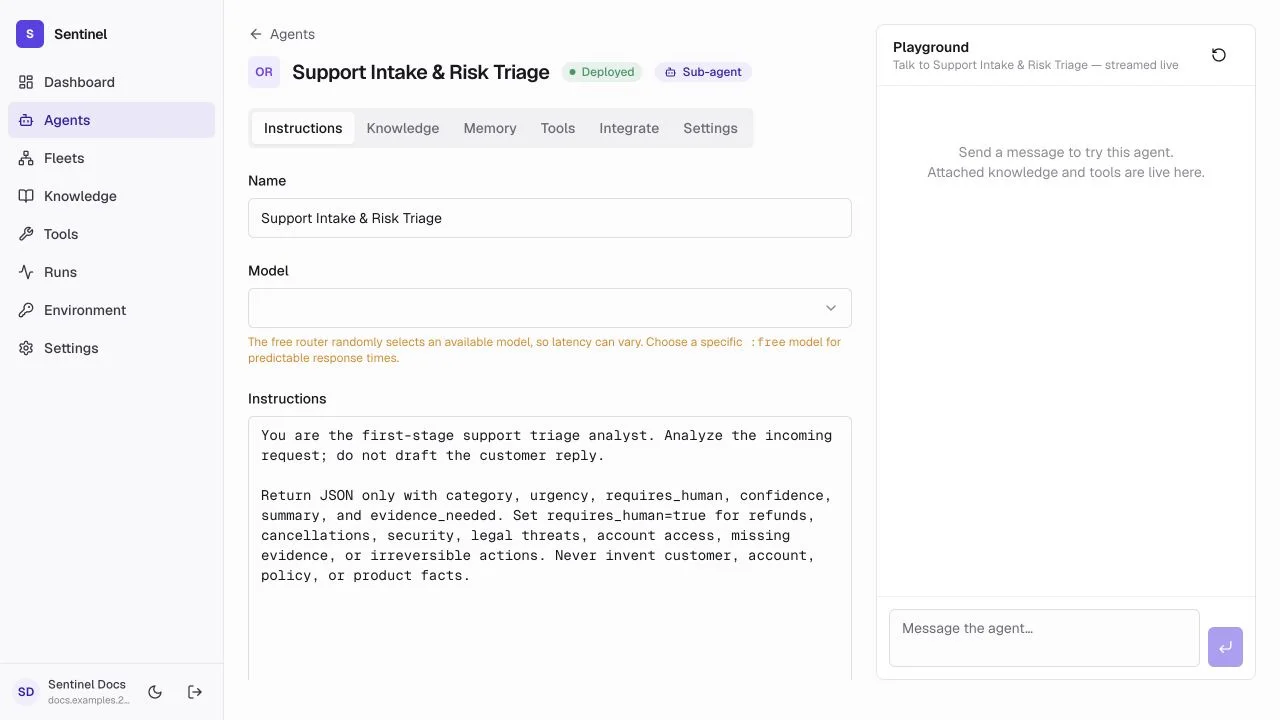
- 1Tactical roleA narrow responsibility makes this worker easy to evaluate and reuse.
- 2Operational promptOutcome, evidence rules, escalation boundary, and response contract are explicit.
- 3ModelChoose a configured model that reliably follows a small schema.
- 4PlaygroundExercise the live configuration before adding it to a fleet.
Configure the worker
- 1
Create the draft
Name it Support Intake & Risk Triage, choose Tactical node, and select a configured low-latency model. - 2
Write the job
Classify the request, summarize facts, identify account-changing or high-risk work, and never perform the requested action. - 3
Add boundaries
Requirerequires_human=truefor security, payment, legal, deletion, or low-confidence cases. - 4
Keep access narrow
This node needs no broad action tool. Attach knowledge only if the classification policy lives in an approved source.
Structured response
Triage output used by the fleet condition
{
  "summary": "Customer requests an account email change.",
  "category": "account_access",
  "severity": "high",
  "requires_human": true,
  "confidence": 0.97
}
The next If/Else node reads requires_human directly. The workflow never attempts to infer a branch from prose.
Test and deploy
Create the draft, attach knowledge and tools, and use Playground before enabling deployment in Settings. The Integrate tab then provides the resource-scoped invocation flow.