Build
Knowledge
Ground answers in documents your team controls.
Knowledge base detail
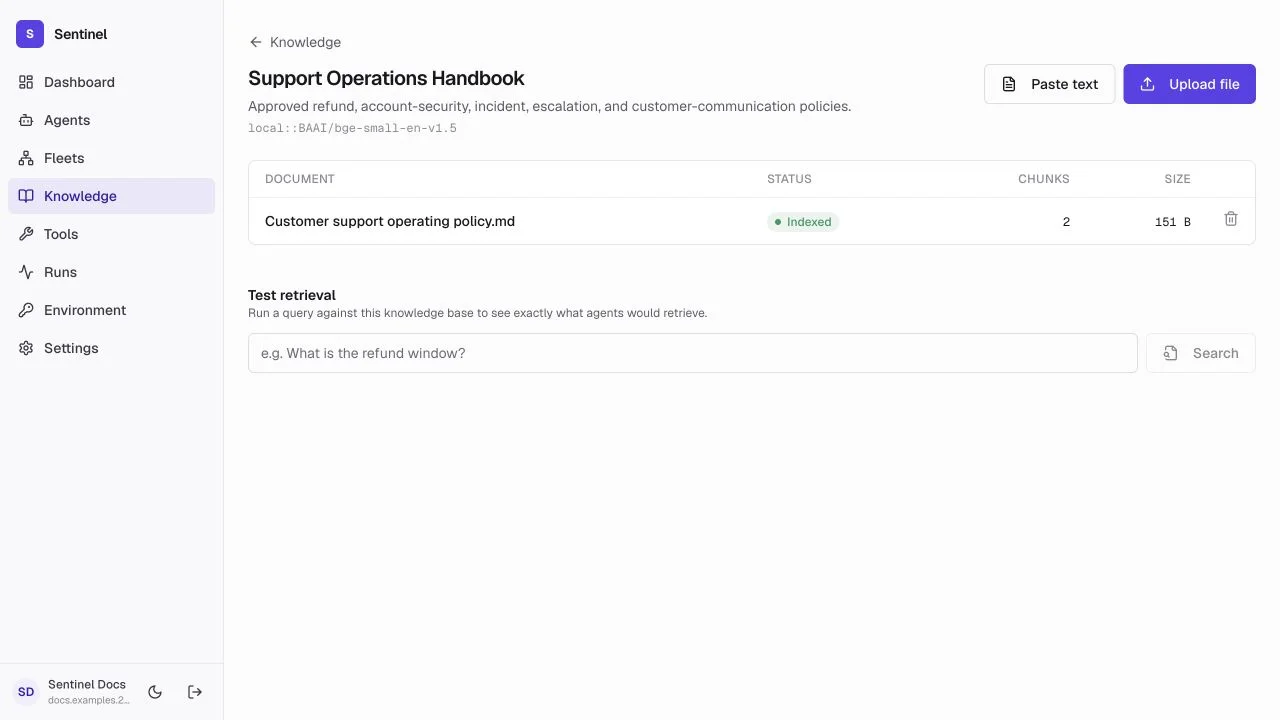
- 1Pinned embedding modelEvery document in the base uses one model and vector dimension.
- 2Ingestion actionsPaste text for small sources or upload PDF, text, and Markdown files.
- 3Document lifecycleStatus, chunk count, size, errors, and delete action appear per document.
- 4Retrieval testQuery the base directly to inspect what an attached agent would receive.
Ingestion flow
- 1
Create the knowledge base
Name it for one coherent subject, policy set, or audience. - 2
Choose an embedding model
Use local embeddings for no-key setup or a configured cloud model when its quality and operations fit your needs. - 3
Upload documents
Add PDF, text, or Markdown files and wait for Indexed. - 4
Attach it to an agent
Grant access only to agents whose job needs those sources, then test retrieval and citations.
Choose embeddings
The embedding model is pinned after documents exist because changing vector dimensions requires re-indexing. Each embedding model requires the matching provider key.
Test retrieval
Search with a real user question. Review returned chunks for authority, relevance, duplication, and missing context before changing the agent prompt.
Content quality
- Prefer current, authoritative sources with descriptive titles.
- Remove duplicates and superseded policies.
- Keep unrelated subjects in separate knowledge bases.
- Test an answerable question, a conflicting-source question, and an out-of-scope question.