Build
Tools & MCP
Give agents controlled access to external capabilities.
Tools workspace
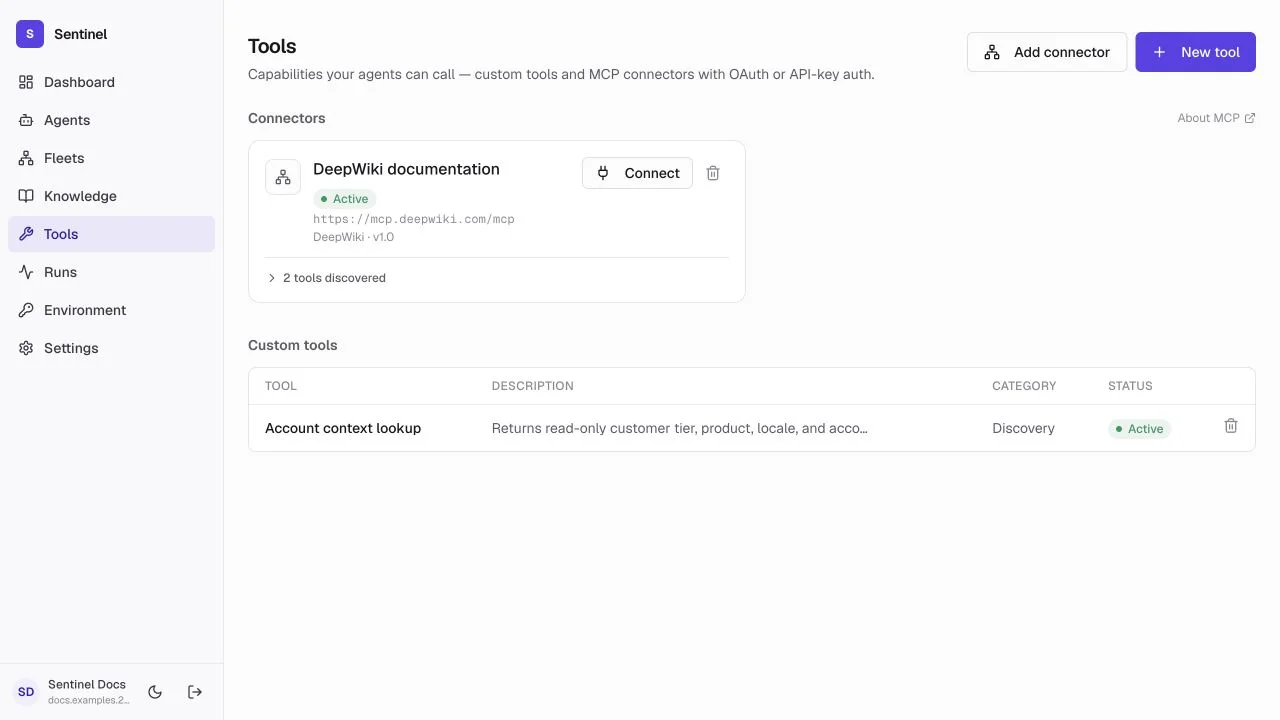
- 1Creation actionsAdd an MCP connector or define a custom tool.
- 2Connector healthServer URL, status, identity, refresh/connect, remove, and discovered-tool count.
- 3Custom tool contractName, description, category, status, input parameters, output schema, and usage metadata.
- 4Operational statusUse active/idle/error state before assigning the tool to an agent.
Tool types
Custom tool
A named action with an input contract and implementation you control.
MCP connector
A remote MCP server whose tools Sentinel can discover and assign.
Authenticated connector
An MCP connection using automatic OAuth, an API key header, or intentionally no authentication.
Tool test
A recorded test run used to verify inputs, outputs, latency, and failure behavior.
Connector lifecycle
- 1
Add the server
Enter a descriptive name and HTTPS MCP server URL. - 2
Authenticate
Use automatic OAuth when supported, an API key only in the expected header, or no authentication only for a public server. - 3
Discover
Sentinel performs the MCP handshake and lists the server's capabilities. - 4
Refresh or reconnect
Use the connector control when tools change or authentication expires. - 5
Assign narrowly
Attach only the required connector to the target agent, then test in Playground.
Custom tool contract
- Use a verb-oriented name and describe exactly when the agent should call it.
- Define typed parameters and mark only truly mandatory inputs as required.
- Document whether the operation is reversible and any approval boundary.
- Define an output schema so downstream reasoning receives predictable data.
- Monitor total invocations, average latency, success rate, and recent usage.
Tool analytics and test runs
Custom tools and connectors are backed by analytics, version, and test-run endpoints (/tools/<tool-id>/analytics, /tools/<tool-id>/versions, /tools/<tool-id>/test-runs). The Tools page does not surface these panels yet, so call the endpoints from your own tooling. Review invocation count, average latency, success rate, and recent usage before assigning a tool more widely, and run a recorded test call to verify inputs, outputs, latency, and failure behavior without touching a live agent.
- Check invocation volume before giving a tool to more agents — a spike can signal an over-broad prompt.
- Use test runs to confirm timeouts and error messages are understandable.
- Treat a tool's analytics and version history as part of the audit trail.