Build
Fleets
Compose agents and logic into observable, durable workflows.
Production flow
Use a fleet when the mission needs independently testable stages, deterministic routing, or approval. This support-resolution fleet triages risk, researches evidence, drafts a grounded answer, audits it, and sends unsafe or low-confidence work to a person.
Start from a template
When you create a fleet, the New fleet dialog offers prebuilt starting points in addition to a blank canvas. Selecting a template seeds the canvas with its nodes, edges, settings, and evaluation cases so you can begin from a known-good skeleton rather than an empty graph. You can also pull reusable node templates (agent nodes, control nodes) from the canvas palette to drop a pre-configured node onto the workflow.
- 1
Open New fleet
Choose a template from the Starting point selector. - 2
Review the seeded graph
Confirm the nodes, edges, settings, and evaluation cases match your mission. - 3
Customize and test
Rename resources, adjust prompts, and run the fleet in Playground before publishing.
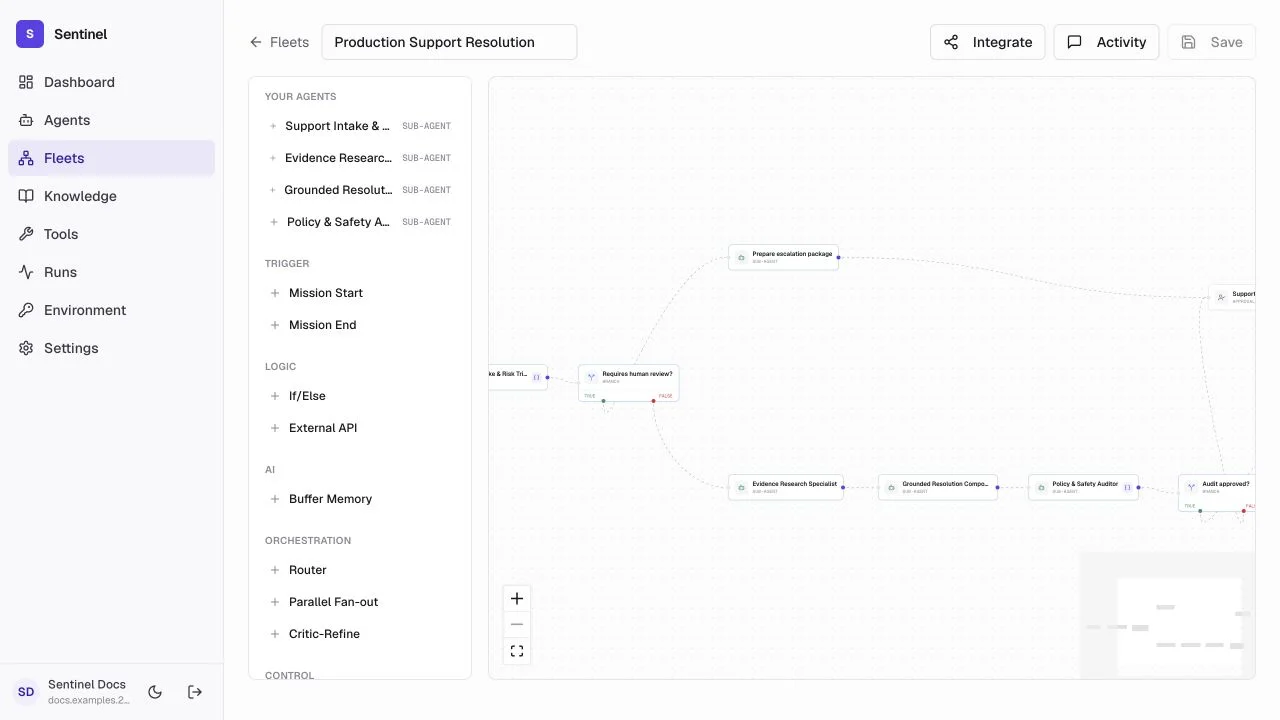
- 1Mission boundaryStart accepts the request; End exposes the final workflow result.
- 2Risk routeStructured triage sends high-risk work directly to an escalation package and approval.
- 3Resolution pathResearch, drafting, and audit are isolated agents that can be tested on their own.
- 4Quality gateA deterministic condition sends approved work to End and exceptions to a human.
Canvas and nodes
Mission start / end
Define the input boundary and final result.
Inline Agent
Create a governed agent directly inside the fleet with model, prompt, tools, and output schema.
If / Else
Branch on a condition evaluated against input or fleet state.
Router
Route to one branch based on keyword matching against the input.
Parallel fan-out
Run independent branches concurrently, then merge results.
Critic-refine
Repeat a bounded draft-and-review loop with a quality threshold.
Loop until
Iterate with an agent until a stop condition is met, with oscillation detection.
Human approval
Pause a durable run until an authorized decision is recorded.
Browser session
Navigate a domain-allowlisted page, capture screenshots, and save checkpoints.
Web search
Search with Tavily, collect citations as evidence.
Knowledge retrieve
Hybrid retrieval across attached knowledge bases with relevance thresholds.
External API
Call any HTTP endpoint with typed request/response and approval gates.
Context / State
Read, write, or transform typed fleet variables across run, thread, or org scope.
Verify
Deterministic assertions, schema checks, citation coverage, and optional model judge.
MCP Tool
Call a connected MCP gateway tool with operation allowlists.
Response
Declare the fleet's public output contract with optional JSON Schema.
Add nodes from the palette, drag their bodies to organize the canvas, and connect output handles to input handles. Use Zoom In, Zoom Out, and Fit View instead of browser zoom.
Node reference
Every node receives its predecessor's output as input and produces output for downstream nodes. The runtime executes in topological order, following edges based on outcomes.
| Node | Key fields | Behavior |
|---|---|---|
| Inline Agent | provider, prompt, fallback, max_tool_calls, gateways, KBs, output_schema | Runs an LLM agent. Falls back to fallback_provider on failure. |
| If / Else | conditionKey, operator, conditionValue | Routes to true or false edge handle. |
| Router | routes[].label, classifier_keyword | Matches input against keywords. Routes to one branch. |
| Verify | schema, minimum_evidence, citation_coverage, judge_agent_id | Deterministic checks plus optional model judge for quality scoring. |
| Human approval | assignee, sla_minutes | Pauses run. SLA expires via background task. |
| Loop until | agent_id, max_iterations, stop_condition | Iterates with oscillation detection. Requires an assigned agent. |
| Context / State | operation, key, value, scope | Typed fleet state. Supports run, thread, and org scopes. |
Fallback branches
Every production node emits an outcome. When a node fails, the runtime follows the edge whose sourceHandle matches the outcome.
- Connect an unavailable branch from every agent and MCP node to a fallback agent or human review.
- Connect a verify_failed branch from every verify node to a correction agent or escalation.
- Connect a no_evidence branch from knowledge-retrieve nodes to web search or clarification.
- Enable require_fallbacks in fleet settings to block publishing when fallback branches are missing.
Configure a node
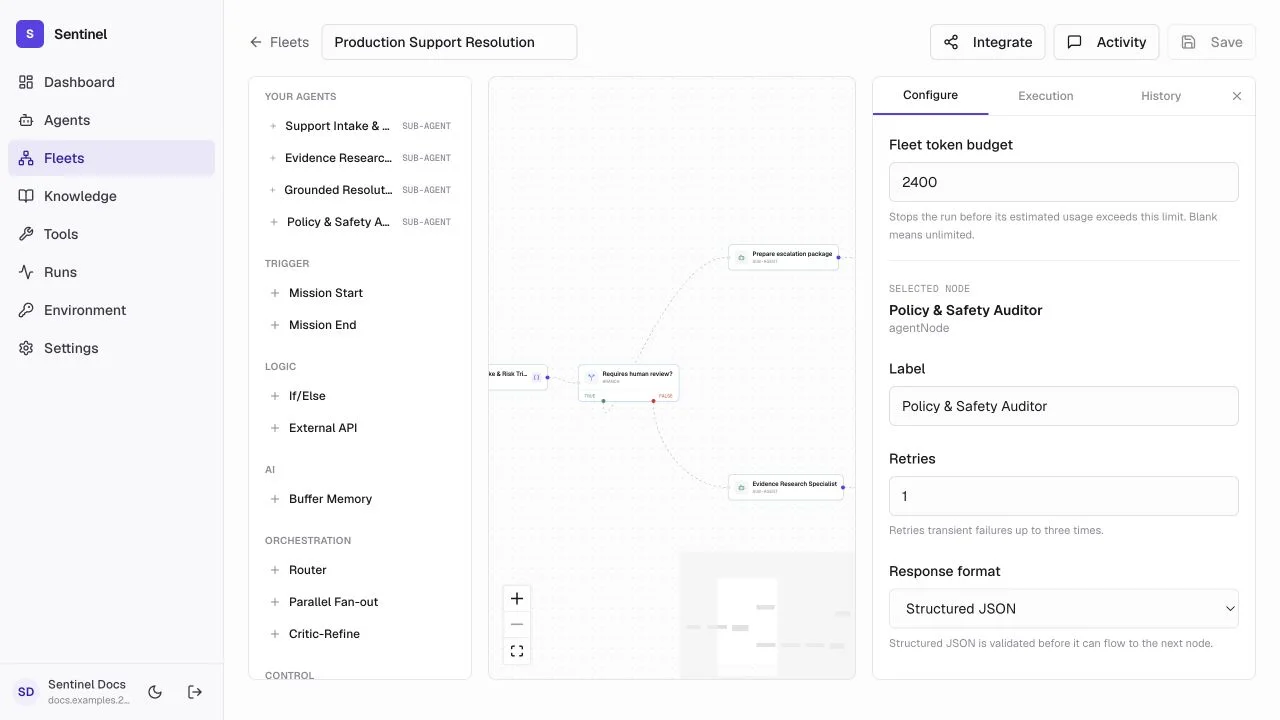
- 1Node paletteAdd agents and deterministic controls from one list.
- 2Selected nodeThe canvas keeps the node and its neighbors visible while editing.
- 3Execution contractSet the agent, prompt, response format, retry policy, and token budget.
- 4SaveSave changes before testing; the header reports unsaved state.
Agent nodes can inherit fleet state or use a focused prompt. Choose structured output when the next condition needs fields such as requires_human or approved. Set retries only for transient failures and cap each node's token use. Configure a fallback model on each agent node so the fleet survives provider outages.
Test and audit
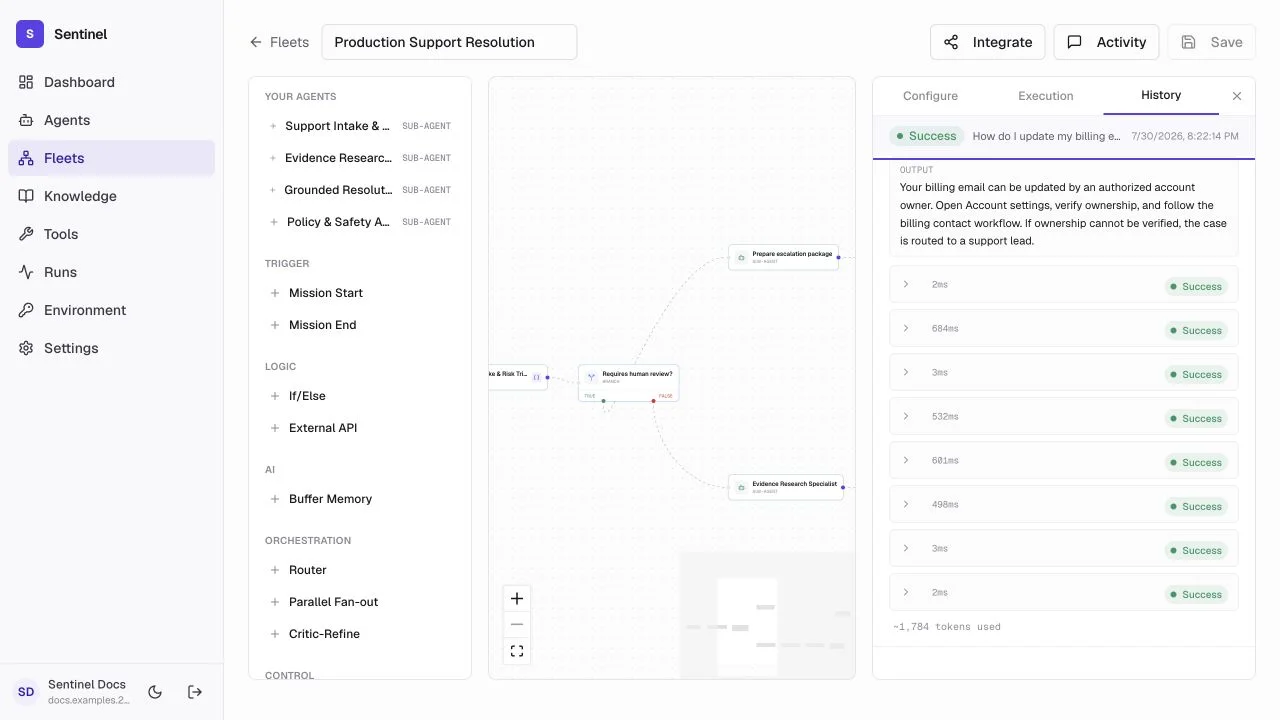
- 1PlaygroundRun a representative mission from the same fleet workspace.
- 2ActivityWatch the active execution and approval state.
- 3HistoryReview completed and failed executions.
- 4Node traceInspect the ordered steps, branch decisions, timing, tokens, and node outputs.
- Run the normal path, every branch, one provider failure, and every approval path.
- Check Preflight before publishing -- it warns about missing fallbacks, responses, and knowledge.
- Use Activity for in-progress work and History for completed audit records.
- Keep the run ID when reporting an issue or correlating an external request.
Evaluate before publishing
Fleets support regression checks before publishing. Define a set of evaluation cases — inputs with an expected status and optional output checks — and Sentinel runs them through the fleet to catch behavior changes before they reach production.
- 1
Add cases
In the fleet's configure panel, add cases with a name, input, expected success or failure, optional output-contains text, expected JSON, and a minimum-evidence requirement. - 2
Set trials
Choose how many times each case runs so you can catch flaky behavior. - 3
Run evaluations
Sentinel executes every case against the current graph and reports whether the fleet passed or failed.
- Cover the normal path, each branch, one provider failure, and every approval path.
- Use expected_output_contains and expected_json to pin down shape and content, not just status.
- Re-run evaluations after every edit so a regression is caught before publish.
Publish a fleet
- 1
Validate the graph
Connect every required path, remove unreachable nodes, and give loops a hard iteration limit. - 2
Set controls
Define the token budget, retry limits, timeouts, fallback models, and approval gates. - 3
Run representative missions
Inspect node outputs and the durable run trace, including failure and approval paths. - 4
Run evaluations
Re-run the evaluation cases and confirm the fleet passes before publishing. - 5
Save a version and integrate
Use the fleet's Integrate panel for readiness, versions, and the scoped invocation key.